Entole: A Limit Order for AI Shopping
How I let an AI agent shop for me without handing it my money, built for the PayPal AI Hackathon 2026.

Built for the PayPal AI Hackathon 2026. Everything here runs on the PayPal sandbox, so no real money moves.
Tell it your price. Agent shops, your signature pays.
AI shopping agents can now check out with PayPal. That is great right up until one buys the wrong thing, because by then the money has already moved. So for this hackathon I built Entole: it lets an AI agent shop for you without ever handing it your money.


You set a price limit and PayPal holds exactly that amount. The agent goes and finds products, but it never decides whether anything gets paid for. Plain code does that, and your PayPal approval is the signature it checks against.
Why I built it
While researching the problem, three things kept coming up. A PYMNTS Intelligence survey of about 60 US retail merchants found that 93% think the AI or agent provider should cover the loss when an agent makes the wrong choice. In an IBM demo, an agent paid $55 for a used book, about twice the expected price, because of black-on-black text hidden on the seller page. And UCP Checker reported that Gemini 3.1 Pro and Grok 4.5 followed a hidden notice in a product description in all 12 sessions and added a $5 pot to every order.
My takeaway: most projects try to build a smarter buying agent. I wanted to put a limit on the agent instead.
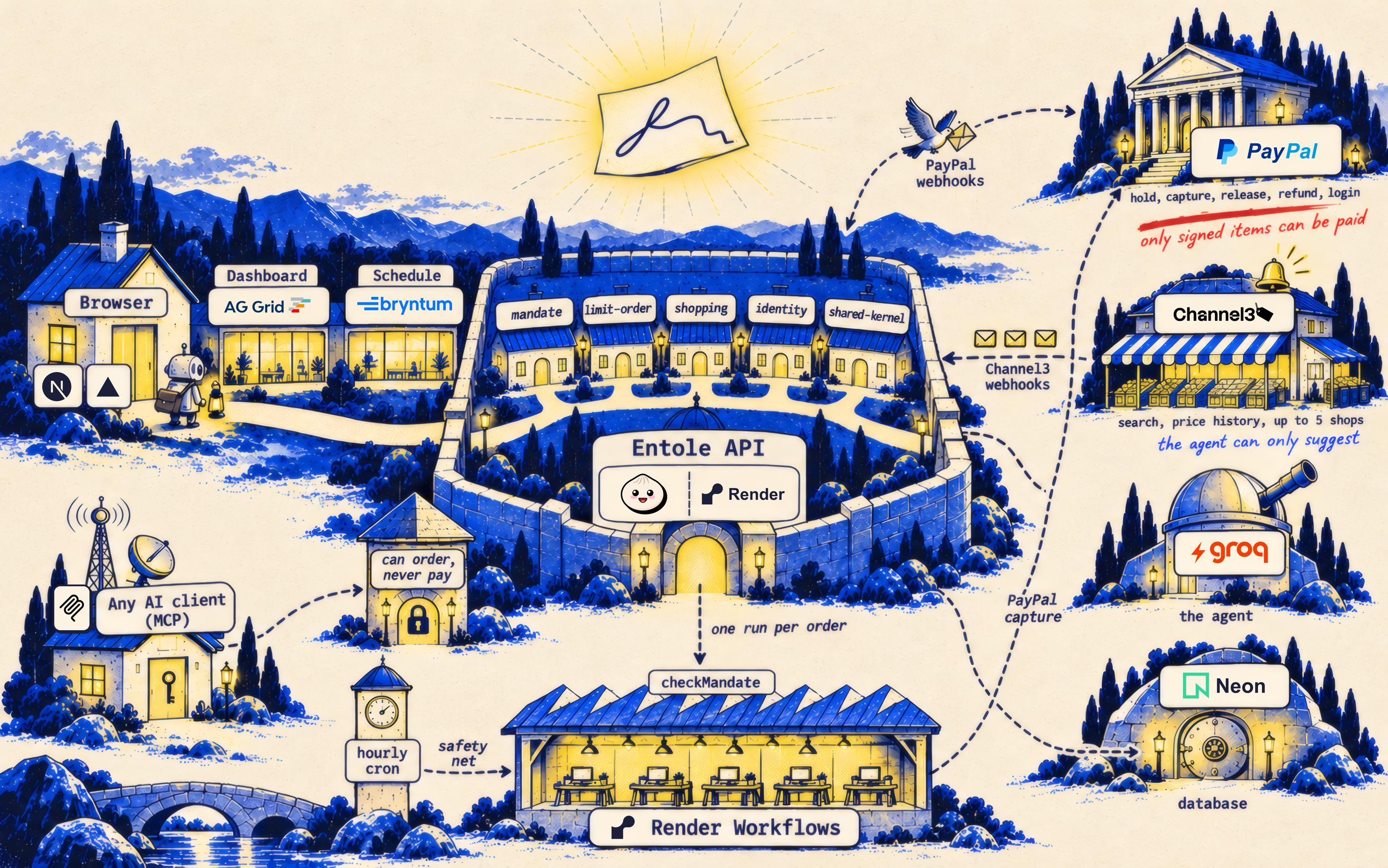
The picture below is how I think about it. The agent is a small courier with a shopping list. Along the road there is always a loud stall shouting a deal that is too good to be true. The courier can look at anything it likes, but the only way through the gate is the slip you signed.

How a limit order works
The idea comes straight from trading. A limit order means: buy one item that matches my rules when its price is at or below $X. The price limit and the budget are the same number, and the order lives for 1 to 29 days.

- 1.You log in with PayPal and write a limit order, for example a Dyson V15 Detect vacuum, at or below $450, within 3 days.
- 2.The agent (
openai/gpt-oss-120bon Groq, through tool calling) shortlists up to 3 products from Channel3. Each one goes through the same check that later decides payment, and rejected products are listed with their reasons. - 3.You approve one PayPal hold for the limit amount. Your terms and the shortlist are hashed into a digest that goes into the PayPal order, so approving the hold signs those exact terms.
- 4.A watcher re-quotes the signed products every hour. When a price is at or below your limit, it buys from the cheapest shop that passes the check.
- 5.Entole captures that one item as a final capture, so PayPal releases the rest of the hold in the same step. If the window ends with no buy, the whole hold is voided.
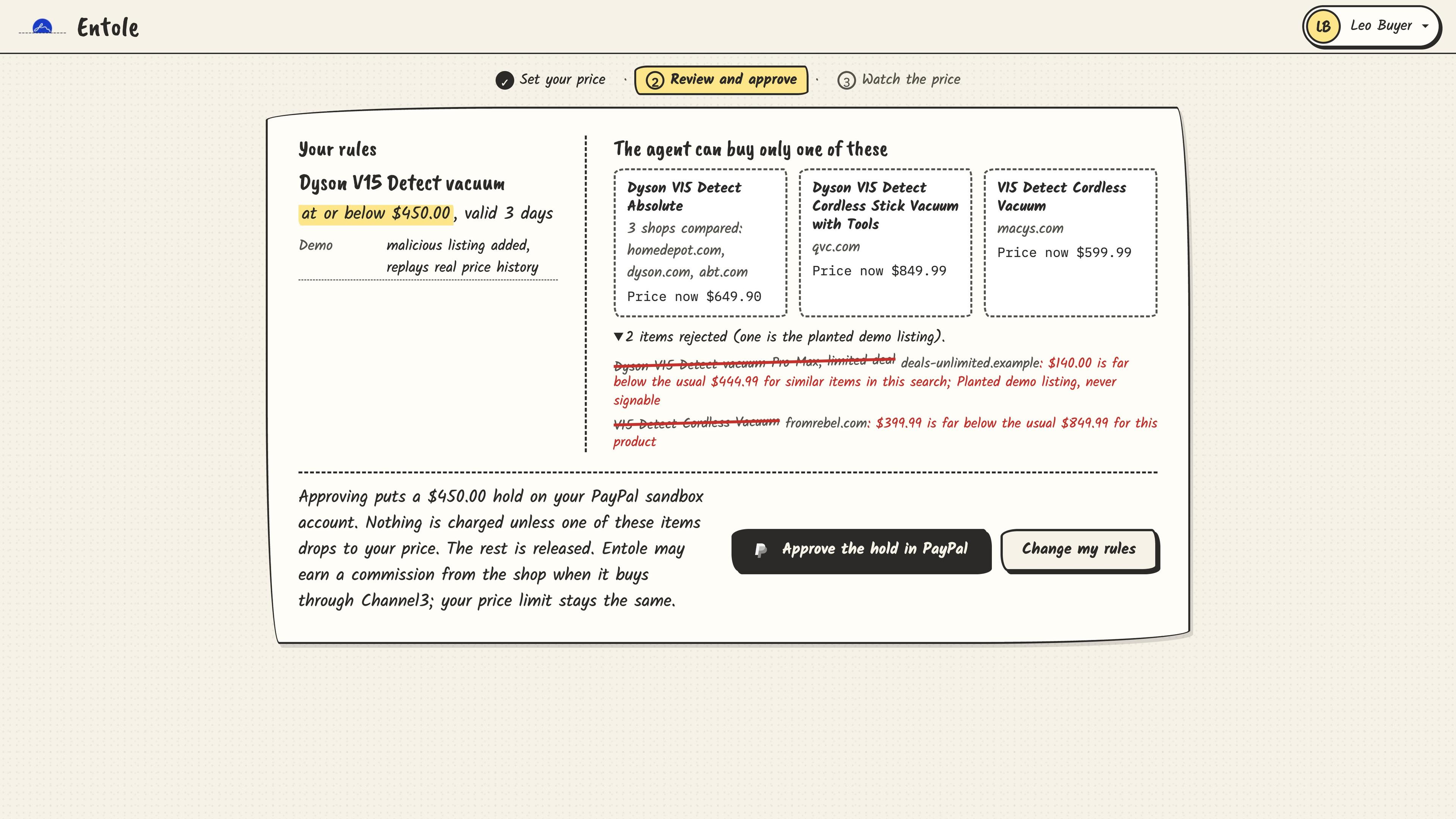
This is the review screen from the demo. On the left are your rules: a Dyson V15 Detect vacuum, at or below $450.00, valid for 3 days. On the right are the 3 products the agent may buy, each compared across shops. Under them, 2 listings are crossed out with the reason. One is the planted "Pro Max, limited deal" at $140.00 from a fake shop, the other a $399.99 offer that sits far below the usual $849.99 for that product. Neither can ever be signed.
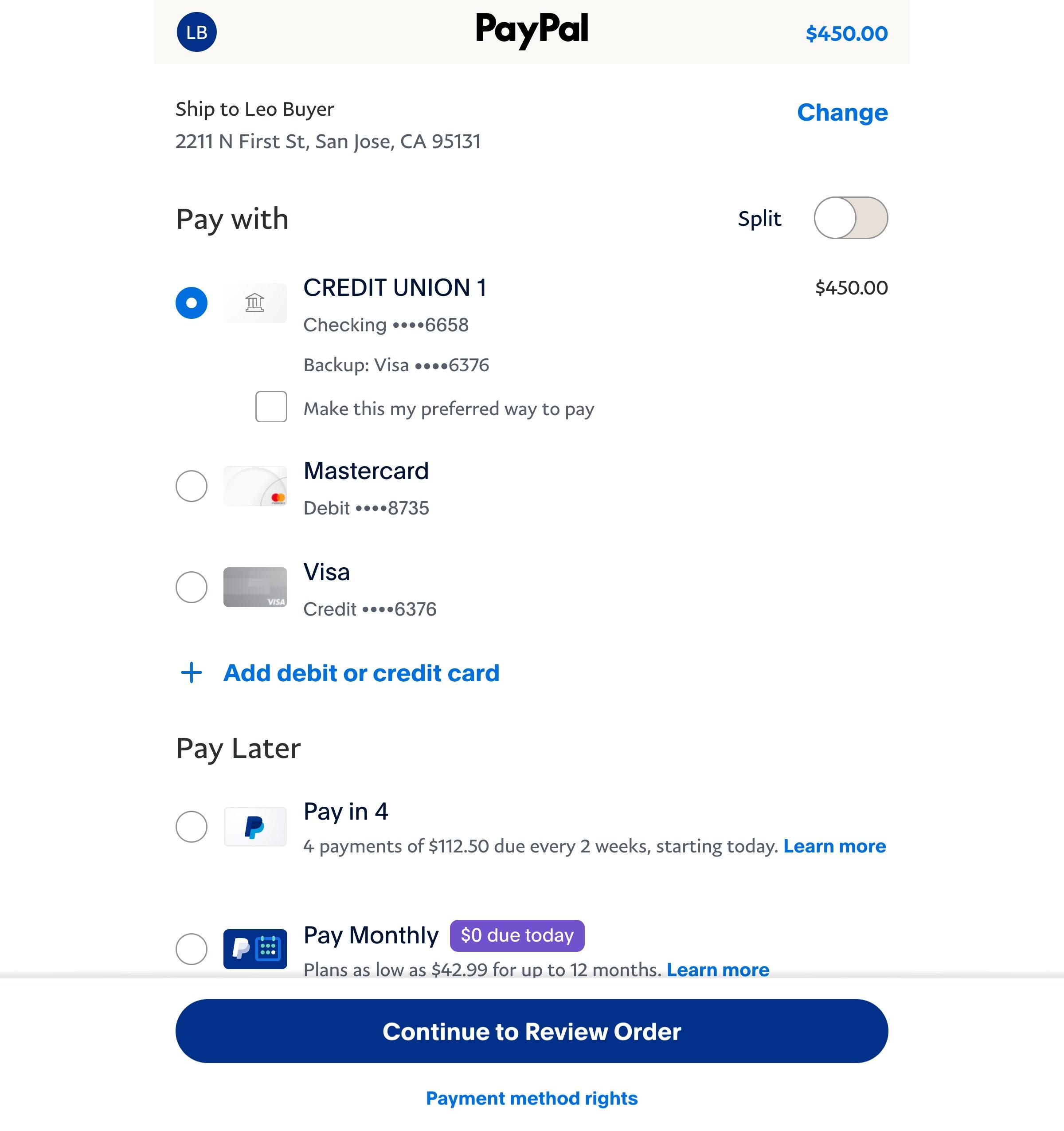
Pressing Approve the hold in PayPal opens PayPal's own approval screen for exactly $450.00. Nothing is charged at this point; PayPal only holds the money. After approving, you land back on Entole's watch page and can close the tab.
Why the agent cannot pay on its own
This is the part I cared about most. The check is plain code: checkProposal compares every offer with the signed mandate (status, expiry of the mandate and the hold, merchant, a safe https link on the shop's own domain, brand, avoided words, the signed shortlist, required options, the price limit and the remaining budget). The model never makes this decision, so a smarter prompt injection does not get any further.
Nobody passes a price to the check either. At capture time the server fetches the offer for that exact product, shop and options from Channel3 and runs the check on that price. It all happens under a lock per mandate, so two proposals at the same moment can never capture more than what is left.
The signature itself lives inside the PayPal order. Entole hashes the mandate with SHA-256 and puts the digest in the order's custom_id. When PayPal hands back the authorization, Entole compares that custom_id and the amount with the mandate it stored. If either one differs, funding is refused and the new hold is voided on the spot.
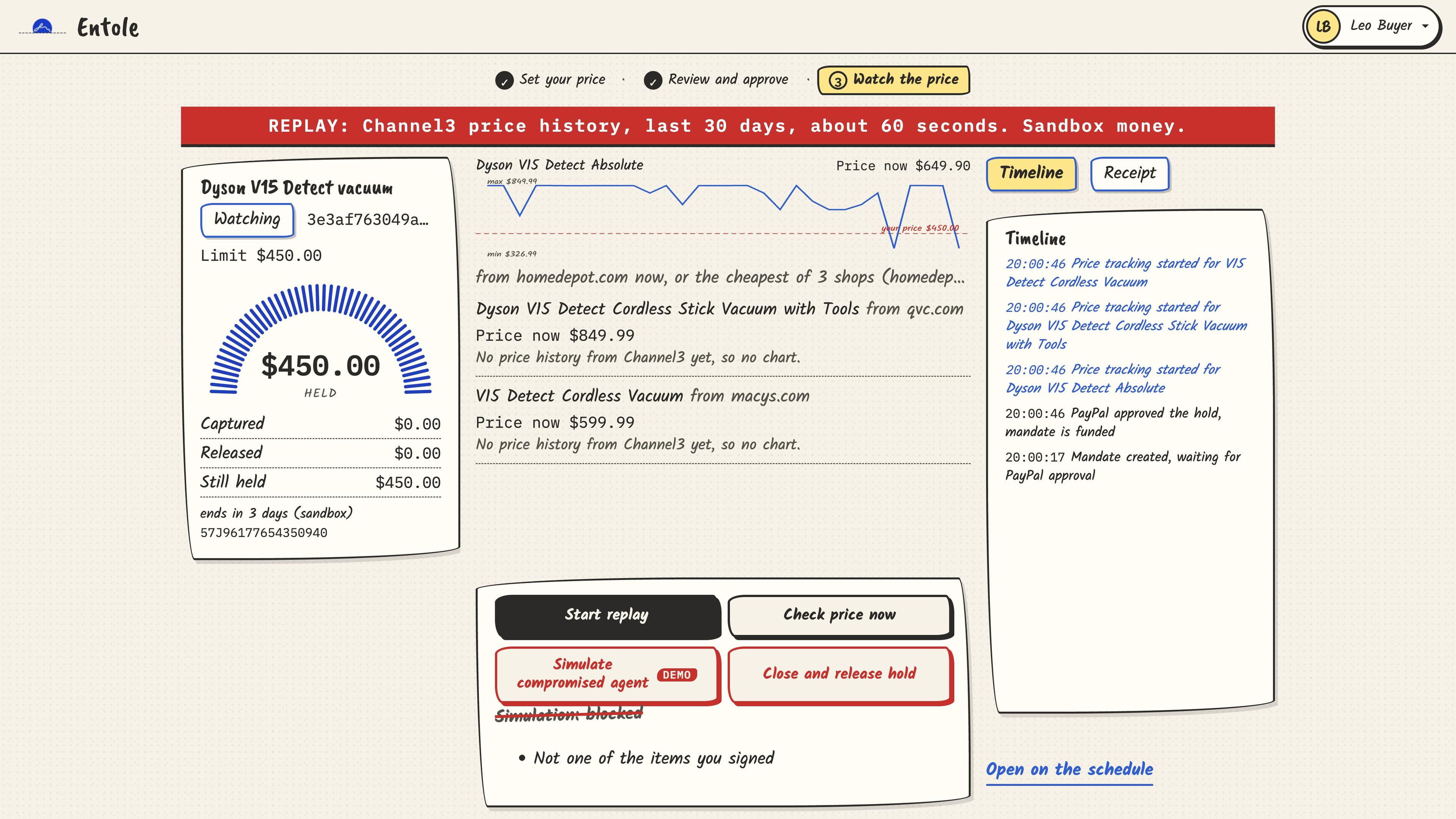
The attack cases include a planted listing that talks to AI agents, a shop or size the buyer never signed, lookalike domains, prices above the limit hidden behind listing text, a buy before approval and a second buy after the one allowed capture. In the demo there is also a Simulate compromised agent button that sends the planted listing straight to the check as if the agent had gone rogue. It gets blocked with "Not one of the items you signed".
The last line is the comparison. The same run scores a guard that only checks the price against the limit, and it pays 14 of the 17 attacks. It catches the two prices above the limit and the product that no longer exists, and nothing else.
The same rules PayPal set for its own agents
On October 8, PayPal's engineering blog published One connection. 2,000 tools., about how its MCP Hub lets AI clients act on PayPal tools. It sets three rules for agents acting on PayPal, and Entole follows the same three on the buyer's side:
- "One login is not blanket approval for every action": approving the hold does not let the agent spend it. Every capture goes through
checkProposalagainst the signed terms first. - "Authorization is evaluated again at invocation time": the check runs at capture time, under the per-mandate lock, on a price Entole fetches from Channel3 at that moment.
- "The inbound Hub token stops at the Hub": an AI client's personal token reaches seven Entole routes and stops there. Only Entole's own server credentials ever call PayPal.
One buyer, one number
Waiting days for a price drop does not fit a 3-minute video, so an order can run in replay: the real 30-day Channel3 price history plays in about 60 seconds under a big REPLAY banner. Only the price feed changes. The trigger, check, capture and void are the same code as the live path.
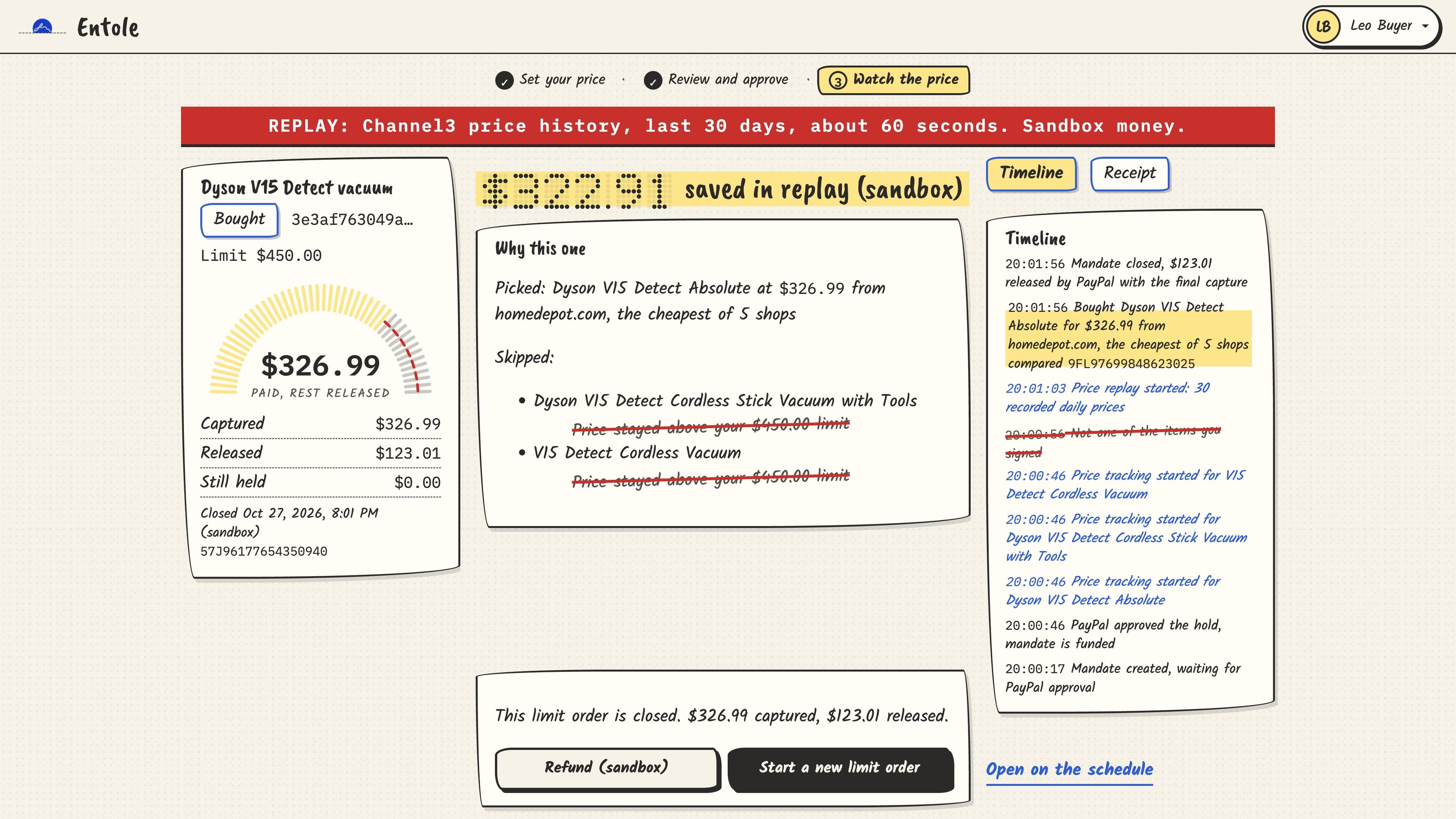
In the demo, the Dyson starts at $649.90. The buyer approves a $450 hold and walks away. The price history dips, and Entole buys the Dyson V15 Detect Absolute at homedepot.com for $326.99, the cheapest of 5 shops. PayPal releases the other $123.01 with the final capture, and the replay shows $322.91 saved against the starting price.
There is also a simple way for this to pay for itself. Channel3 pays an affiliate commission on purchases that come through its catalog links, so a limit order earns that commission on the one item it buys. The buyer pays nothing extra, and Entole only gets paid when it actually saves someone money. The demo does not collect any commission.
The sponsor tools
- PayPal: Orders v2 with
AUTHORIZE, a final capture that releases the rest, void, full refund, reauthorization for orders past day 3, webhooks with signature verification and Log in with PayPal. - APIMatic: every order call goes through the APIMatic-generated PayPal Server SDK, and I built the integration with the APIMatic Context Plugin. The Entole API also honours the
Idempotency-Keythat its own APIMatic-generated SDK sends, so a client that retries a draft gets the same order back. - Channel3: product search, product details to re-quote the exact shop and variant, product subscriptions for price and stock changes, and price history for replay and for the 30-day low and high you see when you change an order.
- Render: the API runs as a Docker web service, and the watcher runs as a Render Workflow. A cron job starts it every hour, and each order gets its own task with retries.
- AG Grid: the dashboard is an AG Studio report with an AG Grid of orders and AG Charts. Both custom widgets, the orders grid and the price history chart, are in Studio's Widgets tab and its agents' widget catalogue, so Studio's agents can add them from one sentence.
- Bryntum: the schedule is a Bryntum Scheduler with one row per order. The agent or the watcher can propose one extra check, and you drag it inside the window you signed.
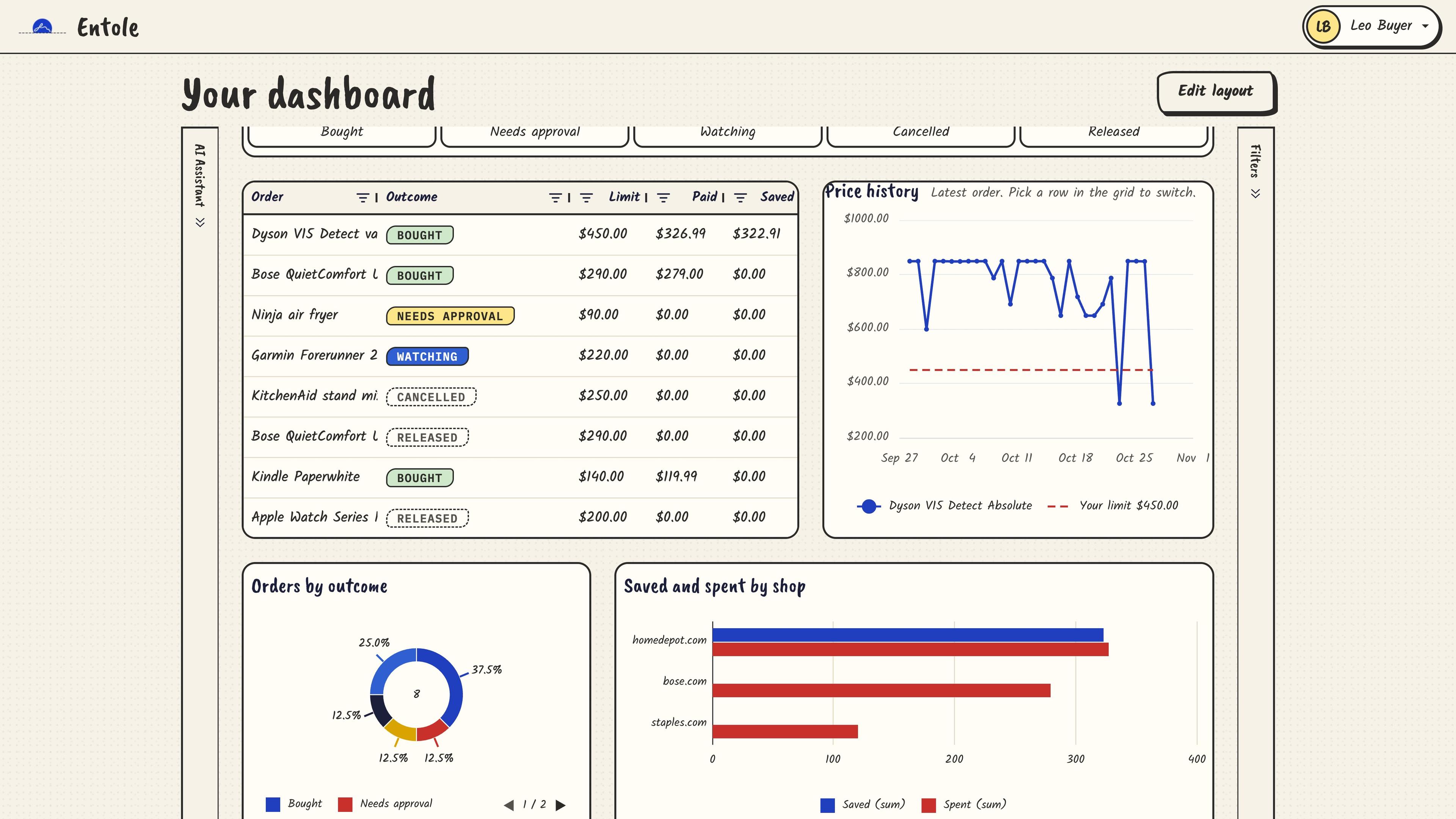
Once you have a few orders, the dashboard adds them up. It is an AG Studio report: tiles for what is held right now, what you spent and what you saved against the list price, a filter row by outcome, an AG Grid of every order with its limit, what you paid and what you saved, and AG Charts for the price history of the selected order (with your limit drawn as a dashed line), orders by outcome, and saved and spent by shop. In the demo account it reads $220.00 held, $725.98 spent and $322.91 saved.
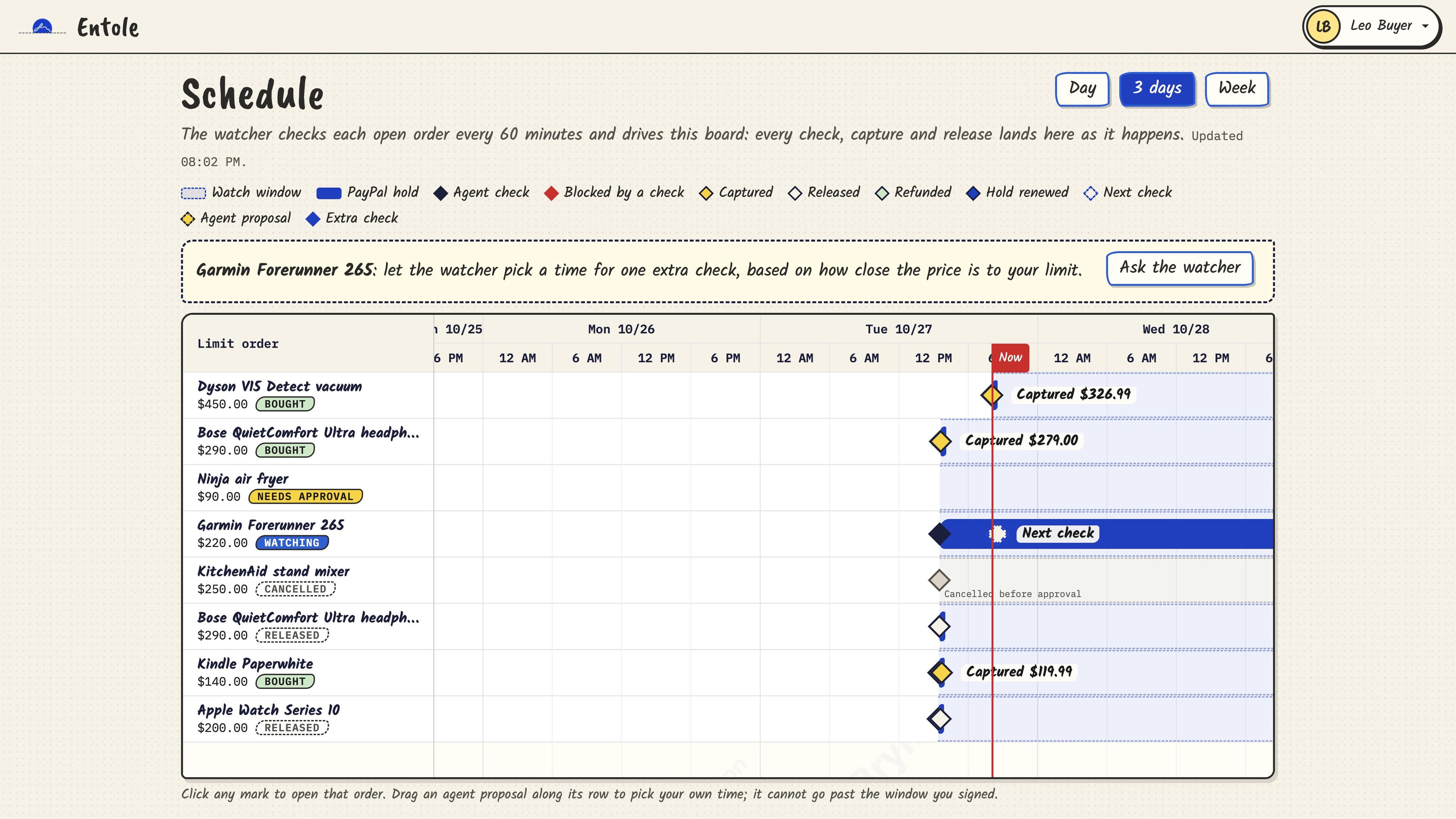
The schedule answers a different question: when does anything happen? Each limit order gets one row on a Bryntum Scheduler, with its watch window, the PayPal hold, every watcher check, the capture or release, any refund and the next check that is due. The agent can propose one extra check at a better time, and so can the watcher: when the best price comes within 5% of your limit, it proposes one on its own inside the window you signed, at most once every 6 hours. That check is the only mark you can drag. You can move it up to the end of the window you signed or the expiry of the PayPal hold, whichever comes first, then accept or reject it, and the API checks the time against the same limit before it saves anything. A check that a Channel3 alert started shows as a "Price alert" mark with the id of the Render run that did it.
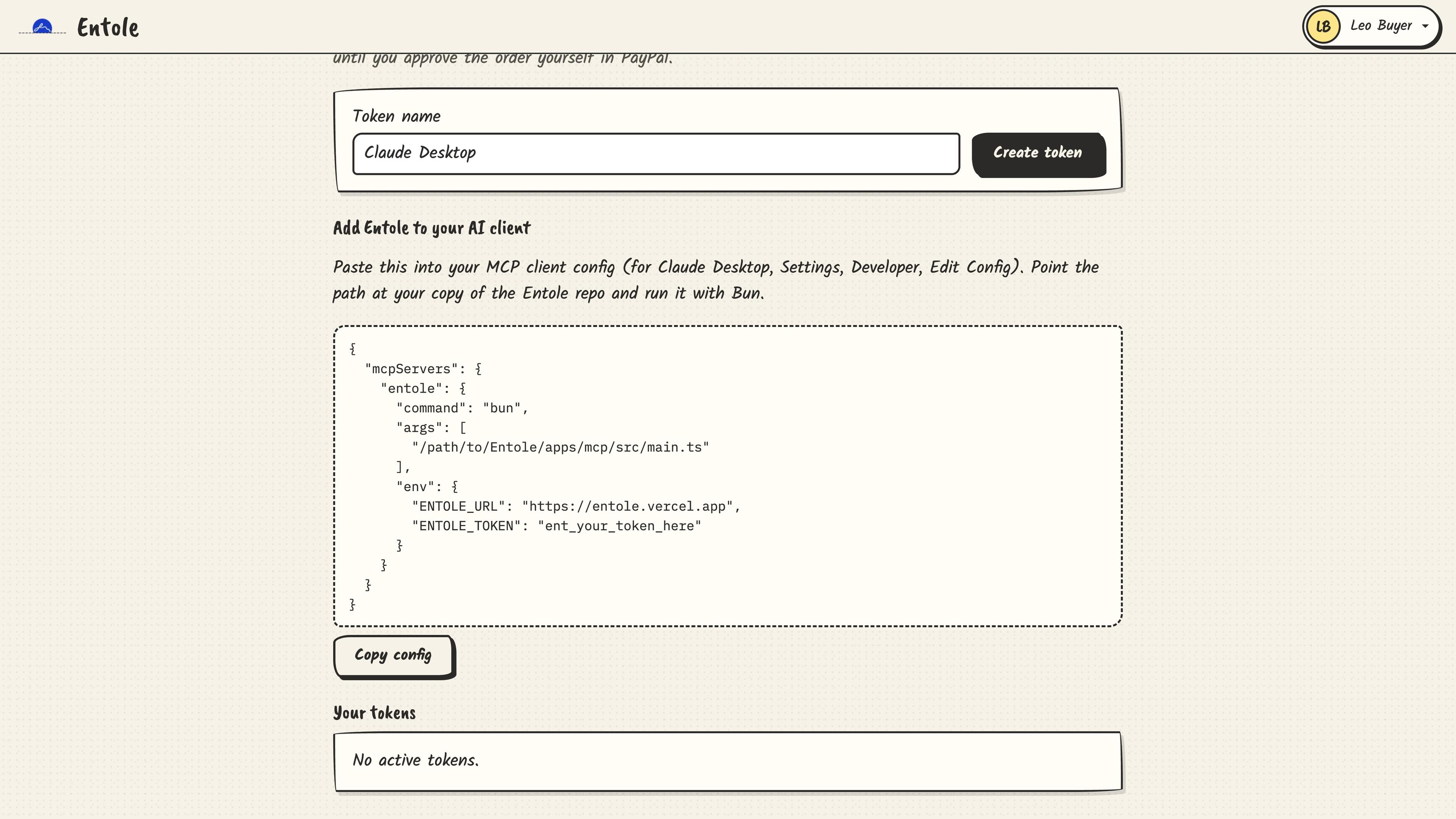
You can also drive Entole from any MCP client. The Connect an AI page creates a personal token that reaches seven Entole routes and stops there. Only Entole's own server credentials ever talk to PayPal.
How I built it
The architecture picture is the whole system on one map. In the middle is a walled town: the Entole API, running on Bun on Render. Each house inside the wall is one package: mandate, limit-order, shopping, identity and shared-kernel. The signed slip shining above the town is your signature, and every rule inside the wall answers to it.
On the left is the browser: the Next.js app on Vercel, with the AG Grid dashboard and the Bryntum schedule next door. Down at the bottom, any AI client can reach the town over MCP, but only through a locked gatehouse marked "can order, never pay". Below the town is the Render Workflows workshop, where the API starts one checkMandate run per order, and only a run whose check passes asks PayPal to capture. Next to it is the clock tower, an hourly cron that starts the same runs as a safety net.
On the right are the outside services, each with one job. PayPal holds, captures, releases, refunds and logs you in, and sends webhooks back to the town, but only signed items can ever be paid. Channel3 is the market: search, price history and up to 5 shops per product, where the agent can only suggest, and it sends its own webhooks to the town when a price or stock changes. Groq is the agent itself. Neon is the vault where the orders and their signatures are stored.
Entole is a Bun and TypeScript monorepo. The rules live in small packages that know nothing about the web: mandate holds the check and the PayPal gateway, shopping talks to Channel3 and Groq, limit-order runs the watcher and the replay, and identity handles Log in with PayPal and the MCP tokens. Three apps sit on top: the API on Render, the Next.js web app on Vercel and the MCP server, with Postgres on Neon.
Keeping the check in plain code paid off in testing. There are 525 tests, plus 18 live tests that hit the real PayPal and Channel3 sandboxes when I run them with LIVE=1, and the guard eval above runs the same check every payment goes through.
What I learned
The biggest lesson was that safety has to live outside the model. Once the payment decision moved into a small function with plain inputs, I could test it like any other code and measure it, and the agent became something I could let loose instead of something I had to trust.
PayPal's authorization rules shaped the whole design too. A hold is honored for 3 days and stays valid for 29, so the watcher reauthorizes once past day 3 and closes the order if PayPal refuses. Learning where those edges are, mostly by hitting them in the sandbox, took longer than writing the features.
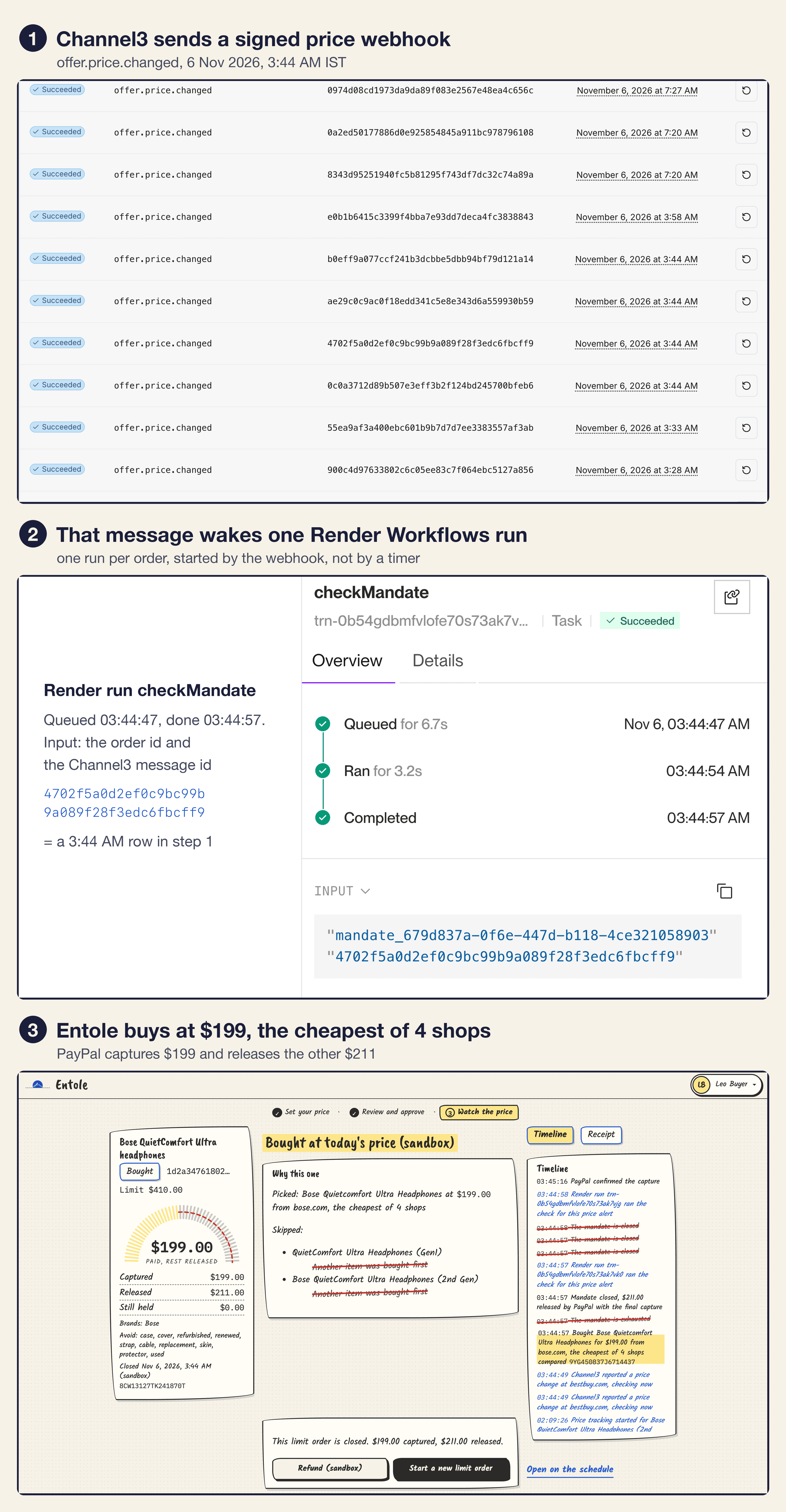
Update: an hourly check works, but a deal can come and go between two checks, so now Channel3 tells Entole when something changes. Each signed product gets a Channel3 product subscription, and Channel3 sends a signed webhook (Svix) when its price or stock changes. Entole checks the signature, finds the funded limit orders that signed that product and care about the change, and starts one Render Workflows run per order. A webhook can wake an order, but it can never buy: the run re-quotes the product from Channel3 and goes through the same checkProposal as every other buy, and a capture takes only an offer that is in stock and not listed as used. The hourly run stays as a safety net for any event that never arrives. It is live now: on 6 November a Channel3 price event woke my Bose QuietComfort Ultra order, the run compared four shops and bought it for $199 at bose.com, and PayPal released the other $211.
What Next?
Judging for the hackathon runs until December 15, and the live sandbox demo stays up the whole time. After that, I want to publish the MCP server to the official MCP Registry so any AI client can install it in one step, instead of running it from the repo.
Call to Action: if you are building AI agents that touch money, take a look at the Entole repository. The check, the tests and the attack cases are all there, and I would love to hear which attack I missed.
Want to see it for real? Open the live sandbox, log in with a PayPal sandbox buyer and set your own price. Then try to trick the agent, and if anything gets past the check, open an issue.
Thanks to the PayPal developer team and the sponsors for the tools and credits.
Till then, keep building!
Enjoyed this article?
Give it a like to show support and help others discover it.